Digital Signage Installation: Build the Site Pack Before Delivery
Check packed dimensions, access routes, receiving, services and mounting readiness before delivery. Copy the site-pack and handover checklist.
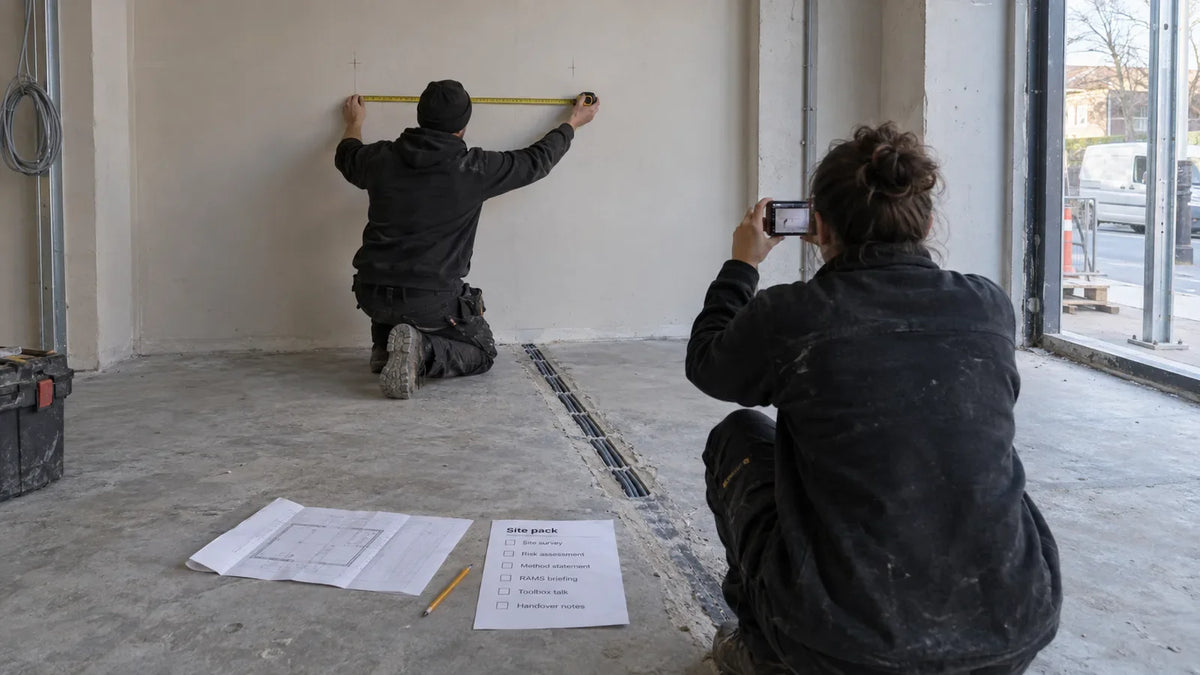
A display can be correctly specified and still arrive at a site that is not ready. The packed unit may not fit through the access route, the receiving team may be absent, or the power and network points may be inaccessible after mounting. Before digital signage installation, assemble a site pack that connects the delivery route, receiving arrangements, installation conditions and final handover to each screen position.
This is the step after choosing where a screen belongs. It gives the supplier, installer and site team the information they need to prepare the same job.
What makes the site pack useful?
Keep a marked plan, dated photographs, measurements and a responsibility list together under one revision. Use the same position IDs in the quotation, packing information and installation records. If the site changes, update the pack and name the affected positions.
Our retail placement guide covers the screen's purpose and position. This article focuses on what must be ready for delivery and handover. The wall-mounted buying guide addresses the display setup; the site pack connects that setup to the actual wall and access route.
If you do not know a measurement, write “to be confirmed” instead of a guess. A door width scaled from a photograph is a planning note, not a clearance you can rely on.

Check the route using the packed dimensions
Obtain the packed dimensions and handling information for the proposed setup. Then check the route from the unloading point to the installation position. The display's visible screen size is not the size of its shipping package.
Record door openings, corridor turns, lift access and the final approach. Include obstructions such as fixed counters, door closers and restricted loading areas. Photograph the route so the delivery or installation team can understand where each measurement applies.
Ask the responsible logistics and site personnel to confirm handling arrangements. A route that appears wide enough can still involve an unavailable lift, restricted working hours or an unsuitable handling method. Do not substitute a generic article for their assessment of the actual load and site.
Agree who receives the delivery
Name the receiving role and backup contact through the project's approved communication process. Confirm the delivery location, allowed time window, unloading arrangements and where the package can be stored before installation.
Agree how package condition will be recorded and how exceptions will be reported under the delivery process you agreed. Dated photographs of the package and labels can help establish what arrived. Store those records in the project file without publishing shipping labels or private contact information.
If delivery and installation happen on different days, assign ownership of storage and movement between them. “Delivered to site” is not necessarily “delivered to the mounting position.” Make the scope explicit in the quotation and the site pack.
Confirm the services and mounting conditions
Mark the power, network and cable route on the installation drawing. Check how connections remain accessible after the display is installed and how service personnel reach them. Name which party supplies or prepares each part of the site work.
The mounting surface, fixings and electrical work must be confirmed by qualified site personnel for the chosen model and local requirements. Ask the supplier for the model-specific dimensions, mounting information and needed installation requirements. Those documents support the site assessment; they do not replace a structural conclusion about the wall.
For wall-mounted displays, include the mounting surface and connection access. For a floor-standing setup, confirm the planned placement, cable route and any model-specific securing requirements.

Copy this site-readiness checklist
| Site-pack item | Evidence to attach | Who confirms it |
|---|---|---|
| Marked positions | Current plan with position IDs and orientation | Client/project lead |
| Access route | Photographs and confirmed clearances against packed dimensions | Logistics and site team |
| Receiving arrangement | Location, window, receiving role and storage plan | Site operations |
| Power/network/cabling | Marked locations, preparation status and access arrangement | Responsible site trades/IT |
| Mounting conditions | Model information and site assessment | Qualified installer/site personnel |
| Handover plan | Acceptance checks and records the client will retain | Client and project lead |
Keep open items visible with an owner and a required resolution date. “To be confirmed” is useful while planning; it should not disappear from the record before it has an answer. If an open item affects access or installation, resolve it before the affected work proceeds.
What should the client keep after installation?
Retain the accepted position plan, installed model and setup records, needed serial references, completed checks and service-access photographs. Record deviations from the approved pack, including moved connections or a changed position.
Separate delivery receipt from sign-off that it works. Receiving a package confirms a different event from verifying that the display shows the planned content and can be operated through the agreed process. Use the sample evaluation checklist to define the setup checks before the installation day.
Finish with a handover that another authorized person can use. The client should know where the documentation is kept, who owns an operating issue and how service is arranged. Keep credentials out of the ordinary site pack and use the client's approved access process. Our player access handover checklist covers that separate task.
For a Gemdragon quotation, send the position list, site photographs, confirmed measurements, proposed player/CMS arrangement and delivery requirement. The RFP template helps keep the resulting setup and scope comparable.