Real Estate Window Displays: LED Light Pockets or LCD Screens?
Clarify what an LED window-display quote actually includes, then compare listing visibility, update work, and installation requirements.
A listing changes. Does someone replace a printed sheet, or does a player receive new content? That is the first question to ask when a quote says “LED real estate window display.” The name can describe very different equipment.
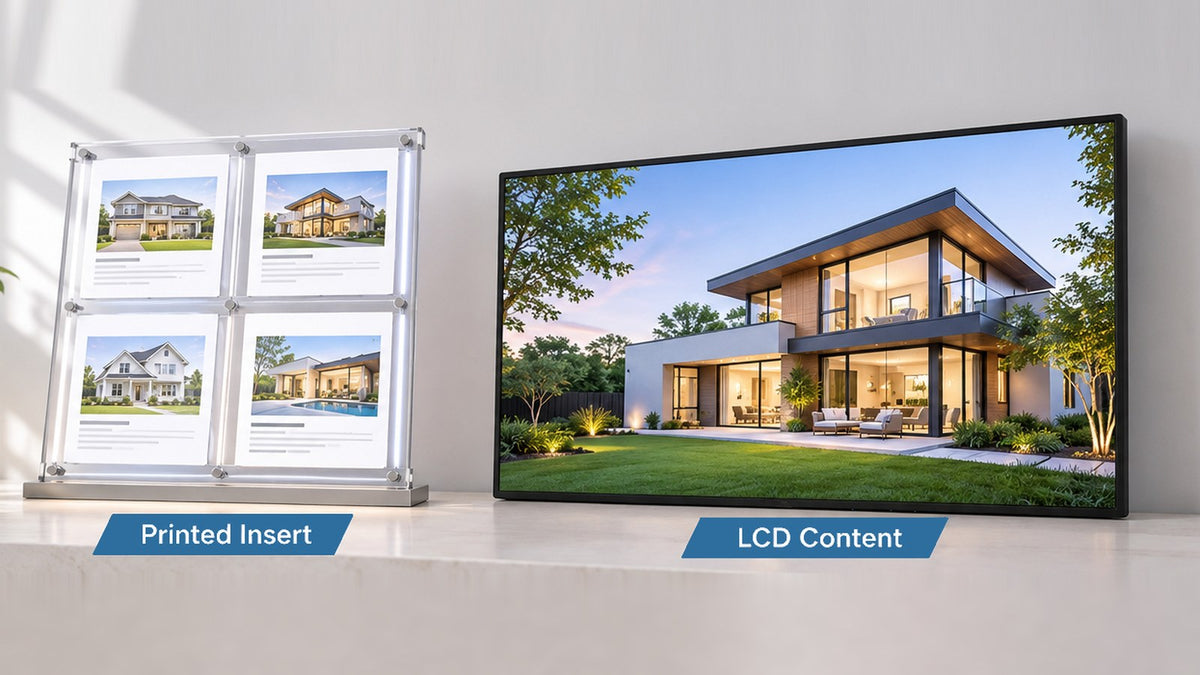
An LED light pocket illuminates an inserted printed graphic. An LCD screen displays electronically supplied images, text, or video. Choose between them by the number of listings people need to see together, the work required to change them, and the installation each system needs. Brightness alone does not settle that decision.
For the broader window survey, listing approvals, and inquiry path, start with our real estate window display planning guide. This comparison addresses the equipment distinction that should be settled before requesting comparable prices.
Ask what makes the picture
In a backlit light pocket, LEDs illuminate a physical property sheet. The light is electronic; the listing is still printed. Vitrinemedia’s LED poster-holder range, for example, describes printed posters and backlight paper separately from its LCD screens. That is evidence of the product category, not a specification for every supplier’s pocket.
With an LCD display, a player supplies the content shown on the panel. Updating that content requires an agreed publishing process. A video-capable screen does not, by itself, retrieve listings or know which property has been withdrawn.
A third use of “LED” is a direct-view LED display, where LEDs form the visible picture. If that is on a quotation, ask the supplier to identify it explicitly. Our LCD backlight versus LED pixel guide explains that separate technology distinction. Gemdragon’s window product discussed here is an LCD, not a light pocket or a direct-view LED wall.

Compare a listing wall with a listing sequence
A grid of individual pockets can keep several property sheets visible at once. A person can compare two adjacent listings without waiting for a loop. The practical limit is whether the photographs and essential text remain readable through the glass at the actual viewing position.
An LCD can show one prominent property, a grid, or a sequence. Those arrangements spend the available pixels differently. Divide a panel into many small tiles and the price, property reference, or office contact may become the first things a passerby loses.
Count what is visible at one moment, then what appears over time. A playlist with twelve properties is not the same presentation as twelve simultaneously visible sheets. A window should not require someone to wait through the digital equivalent of a very slow card dealer.
Bring the same approved sample listings to both demonstrations. Inspect the smallest necessary field, reflections, and the time a person has to read before the content changes. Our playlist and dwell-time guide helps frame that timing test without assuming a universal loop length.

Compare the change, not just the hardware
Property-change comparison worksheet
On a narrow screen, scroll the table sideways to read all columns.
| Question | Illuminated printed pocket | LCD digital screen |
|---|---|---|
| What changes? | The approved printed sheet is produced and replaced. | The approved media or data-driven presentation is published. |
| Who verifies removal? | A named operator checks the old sheet is physically gone. | A named operator checks the old listing is gone from actual playback. |
| What does a network outage affect? | A printed listing does not need a data connection to remain printed. | Behavior depends on the player, cached media, application, and agreed expiry rule. |
| What must the quote include? | Holders, compatible illumination and supports, printing requirements, installation, and maintenance scope. | Display, player, mounting, software and update workflow, connectivity where needed, installation, and maintenance scope. |
| What proves a successful update? | The correct replacement is legible in the window. | The correct version is visible on the intended screen, including after a restart. |
Neither process is self-governing. Someone still approves the photograph, price, status, and permission to publish. In the LCD case, decide whether staff upload finished media or a software provider maintains a listing-data connection. Keep integration and ongoing support in the software scope rather than assuming they arrive with the panel.
Do not treat a cable grid as a universal screen mount
A familiar-looking suspended display is not evidence that its supports or power arrangement can carry a different device. Ask for the exact existing system, the proposed screen’s weight and mounting requirements, and written compatibility information from the responsible supplier or installer.
Some suppliers sell upgrades within their own product systems. That does not make another screen a drop-in replacement. For Gemdragon’s LCD, plan structural support, mains power, cable routing, ventilation, and rear service access around the selected unit. Do not connect it to an existing pocket’s low-voltage supply merely because that supply is nearby.
Keep the equipment indoors behind the glass. Window-facing describes the intended viewing direction; it does not authorize rain exposure. Use the window-display mounting guide for the support and access questions, and the window survey guide for the glass and daylight assessment.

Write a decision the purchasing team can use
A useful brief states how many listings must be visible together, which fields matter from outside, how frequently approved changes occur, and who verifies them. It also records whether existing printed pockets stay in the window. A mixed arrangement may be appropriate, but assign the physical space and update ownership deliberately.
Request two complete scopes if comparing alternatives. Do not compare a pocket-only price with a fully installed LCD system, or omit print handling from one side and publishing work from the other. The print and digital message-allocation guide provides a broader cost framework; this article’s narrower decision is which equipment and listing presentation you are actually buying.
Questions to settle before a quote
Does “LED window display” always mean digital content?
No. It may describe an LED-illuminated printed poster holder. Ask whether the listing is a physical insert, an image on an LCD, or a picture formed by LED pixels.
Will an LCD automatically update from our listing system?
Only if the selected software and source connection provide that workflow and have been verified. A network port or Android operating system does not establish MLS, CRM, or property-software compatibility. Use the listing-feed removal test when an automated feed is proposed.
Can we keep printed pockets alongside a screen?
Potentially. Check sightlines, reflections, support, cabling, ventilation, and which listings belong on each medium. Confirm that a status change is applied to both where the same property appears.
Plan the LCD part of the window
Gemdragon’s Slim-Bezel High-Brightness Window Display is a single-screen, non-touch LCD for indoor installation facing outward through glass. Its listed sizes are 32, 43, 49, 55, 65, 75, and 86 inches. Mounting and playback configuration are selected for the project; property-data integration needs its own confirmed scope.
Send window photographs, dimensions, representative listing artwork, the number of listings that must be visible together, and the intended update method. Include details of any equipment you hope to retain so compatibility can be reviewed before a quote.
Source and next step
Vitrinemedia: LED poster holders and backlight paper establishes the illuminated-print distinction for that supplier. The worksheets above are purchasing methods, not measured savings or customer results. Continue with the real estate window planning guide to connect the equipment decision to listing approval and inquiries.