Real Estate Listing Feeds: Make Withdrawn Listings Disappear
A practical acceptance test for listing removal, incomplete feeds, cached media, and restart behavior on real estate window screens.
A property has been withdrawn from the set approved for the window. The office system is correct. The screen still advertises it. Smooth playback can be surprisingly good camouflage for old information.
For real estate digital signage, test how an ineligible listing disappears, not only how a changed listing arrives. A feed may return new and modified records without sending a final version of every record that has become inaccessible. The software team needs a removal method, and the purchasing team needs evidence from the actual display.
This guide is for brokerage operations, AV integrators, and the developer or software provider connecting listings to a window screen. Start with the real estate window planning guide for the wider hardware, content, and inquiry brief. Here, the task is narrower: define and demonstrate the end of a listing’s display life.
Separate changed records from eligible records
A useful question for the provider is: “If a record stops being accessible to this connection, what removes our last local copy from display?” A successful request for recently modified records may not answer it.
FBS’s Spark RESO Web API replication documentation separates initial download, updating changed data, and purging stale records. It explains that previously accessible listings can become inaccessible, including after status changes. Its purge method compares the complete accessible set of listing keys with local records. This is one provider’s documented implementation, not a universal schedule or proof that a Gemdragon configuration supports it.
Ask which method your actual source permits: a complete eligible-record reconciliation, explicit removal events, or another documented mechanism. Confirm access and display permission for the intended storefront use with the source owner. Access to a feed is not blanket permission to publish its contents everywhere.
Decide which statuses remain eligible for each presentation. An approved program may intentionally include clearly labeled sold properties. The test here concerns a listing that should no longer appear under the agreed rules, rather than assuming one removal policy for every agency and source.

Specify three separate clocks
The source changes at one time, the application retrieves or reconciles data at another, and the player replaces its visible content at a third. A timestamp saying “updated” can refer to any of them. Record their meanings before using them as acceptance evidence.
Listing-removal acceptance contract
On a narrow screen, scroll the table sideways to read all columns.
| Decision | What to agree | Evidence to retain |
|---|---|---|
| Identity | The source’s stable listing key and the relationship to rendered slides and media. | A test record traced from source to the visible slide. |
| Eligibility | Which records and statuses this particular connection is allowed and intended to display. | An approved eligibility rule and named source owner. |
| Removal mechanism | How loss of access or eligibility invalidates local content. | A demonstrated removal, with source and playback observations. |
| Timing | The source checks, removal checks, acceptable visible age, and failure deadline appropriate to the project. | A timeline with clearly defined timestamps; no assumed universal interval. |
| Incomplete retrieval | How failed, unauthorized, truncated, or partly retrieved results are detected and handled. | A controlled failure that does not silently publish an unverified dataset. |
| Recovery | Which validated content can return after reconnecting, restarting, or restoring a backup. | A restart and recovery demonstration on the intended player. |
Do not use an address or a photograph filename as a convenient substitute for a stable listing identifier. A price change may produce another image file for the same listing; a reused image may appear in different contexts. Ask the provider to show how its identifiers connect records, media, and playback assets.
Set timing with the relevant source rules and operating risk. A general “refreshes every few minutes” statement leaves unanswered when an inaccessible record is removed and what happens while the source is unavailable.
Treat a partial response as a failure to resolve
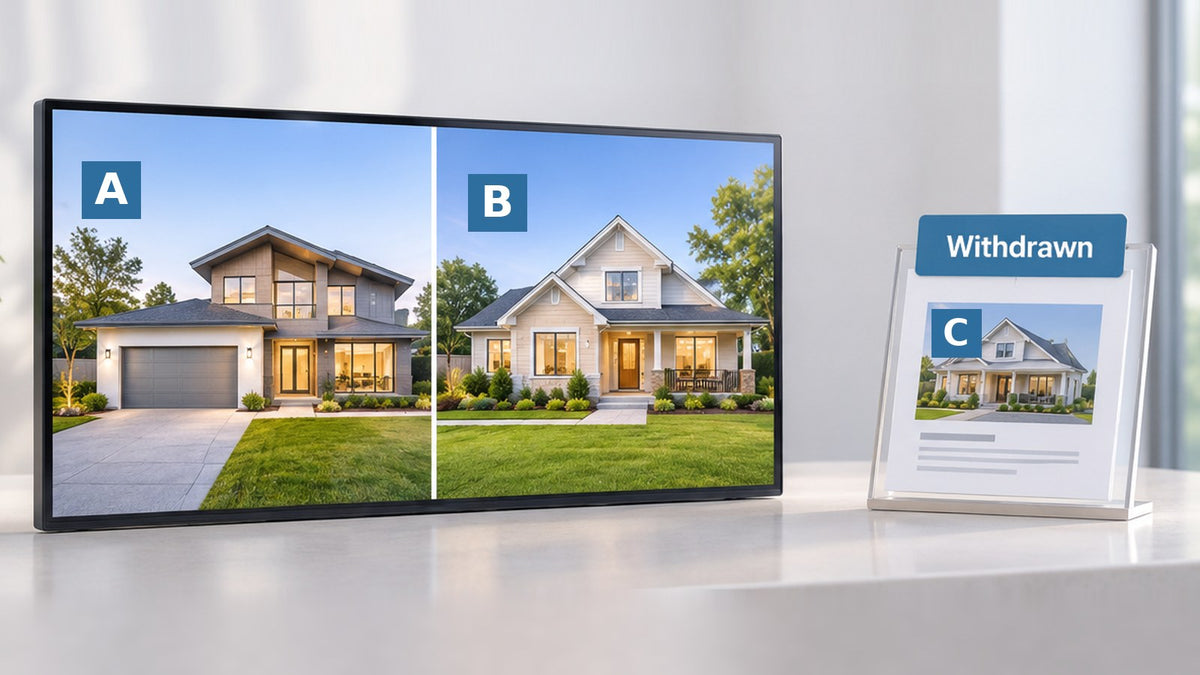
Suppose a controlled test has three fictional eligible records, A, B, and C. The first response contains A and B; the next page should contain C. If that second request fails, the application has not obtained a complete eligible set. It cannot conclude from the first page alone that C was removed.
For the proposed system, ask how it recognizes completion, validates the expected scope, and handles an authorization or filter change. A different credential or narrowed filter can change which records are accessible. That requires a controlled decision, not an unnoticed change to what the office believes is being advertised.
Incomplete retrieval also should not become permission to display an old listing indefinitely. Agree an approved fallback once information exceeds its accepted age, and an alert for the responsible operator. Depending on the project, that could mean a neutral agency message without property availability claims. The API and stale-content guide covers the general fallback contract; this article adds the listing-identity and removal checks.

Run a removal test through to the screen
Use a sandbox or another provider-approved test environment with fictional or authorized records. Do not change a live listing’s market status just to test a display. For every case, record the initial state, controlled change, expected result, observation time, actual playback, and exception owner.
- Start with eligible A, B, and C. Confirm all intended records and approved fields appear. Keep an image or recording of the screen, not only the CMS preview.
- Modify B without changing its identity. Verify that the old version is replaced rather than duplicated.
- Make C ineligible or inaccessible in the test source. Use the provider’s approved method. Verify the removal mechanism catches it even when no useful final record arrives in the change feed.
- Interrupt a paginated retrieval. Confirm the application detects incompleteness and follows the agreed failure and freshness policy.
- Disconnect and restart the player after C has been removed. Watch what appears before the source returns. Check exported images, cached playlists, and fallback presentations for C.
- Restore the source and, separately, rehearse recovery. Confirm the eligibility check is applied before an older content snapshot can resume as current property advertising.
A removed property can survive as an exported JPEG even after its database row is gone. Trace the record to the rendered asset and the playlist that references it. The acceptance target is absence from the relevant public presentation, not merely a successful database job.
Our offline playback test supplies the wider power, network, and caching checklist. Pair it with this record-specific test rather than assuming “offline playback works” means the information remains eligible.
Keep a removal incident actionable
Name who can stop property content, approve the fallback, and contact the software or source provider. Retain a small incident record: listing key in the restricted operating log, affected screen, last verified eligible version, source and publication observations, action taken, and recheck result. Keep private customer records and access credentials out of public screens and shared screenshots.
If an inquiry link or QR code was shown with the listing, check its destination too. The screen may be corrected while an old landing page still implies availability. The agency should decide how that destination explains the current status and offers a suitable next step.
Questions for the software and display brief
Does a successful feed request prove listings are current?
No. Confirm the meaning of the response, the removal process, and the result on the player. A successful incremental update can coexist with an obsolete local record.
Should the system delete every listing when the source returns nothing?
First establish whether the response is a valid, complete result under the intended authorization and filter. An error or incomplete page is not evidence that every property was removed. Follow the agreed failure and expiry policy.
Does Gemdragon include an MLS connector?
This guide does not establish an included MLS or property-system connector. Specify the source, access, application, player, and support owner. Have the software provider demonstrate the integration on the selected configuration.
Bring the software workflow to the hardware discussion
The Gemdragon Slim-Bezel High-Brightness Window Display is a single-screen, non-touch LCD for indoor use behind storefront glass. Send the proposed software and player requirements with your window photographs, dimensions, sample listing layout, and mounting plan. Hardware configuration and property-data integration are separate items to confirm.

If the equipment type is still unclear, compare LED light pockets and LCD window screens first.
Technical source
FBS Spark: RESO Web API Replication documents separate update and stale-record purge operations for that implementation. The acceptance contract and controlled test sequence above are project-planning recommendations; choose the actual mechanism, timing, and authorized use with the responsible providers.