Food Truck Digital Menu Boards: Check the Setup at Every Stop
Check the viewing position, menu version, power arrangement, offline behavior, and pack-up plan at every food-truck stop.
A food truck digital menu board has to be approved again when the truck changes location. Yesterday's menu file may be correct while today's screen faces the sun, blocks the queue, or depends on a connection that disappears during service. Treat the daily setup as a release: confirm the location, the approved menu, the power arrangement, and the recovery plan before customers start ordering.
Start with the work the screen will remove. If the menu rarely changes and a printed board is easy to maintain, keep that option in the comparison. Digital is useful when updates justify the extra equipment and operating routine. A menu should not need its own support vehicle.
Choose the display position for each stop
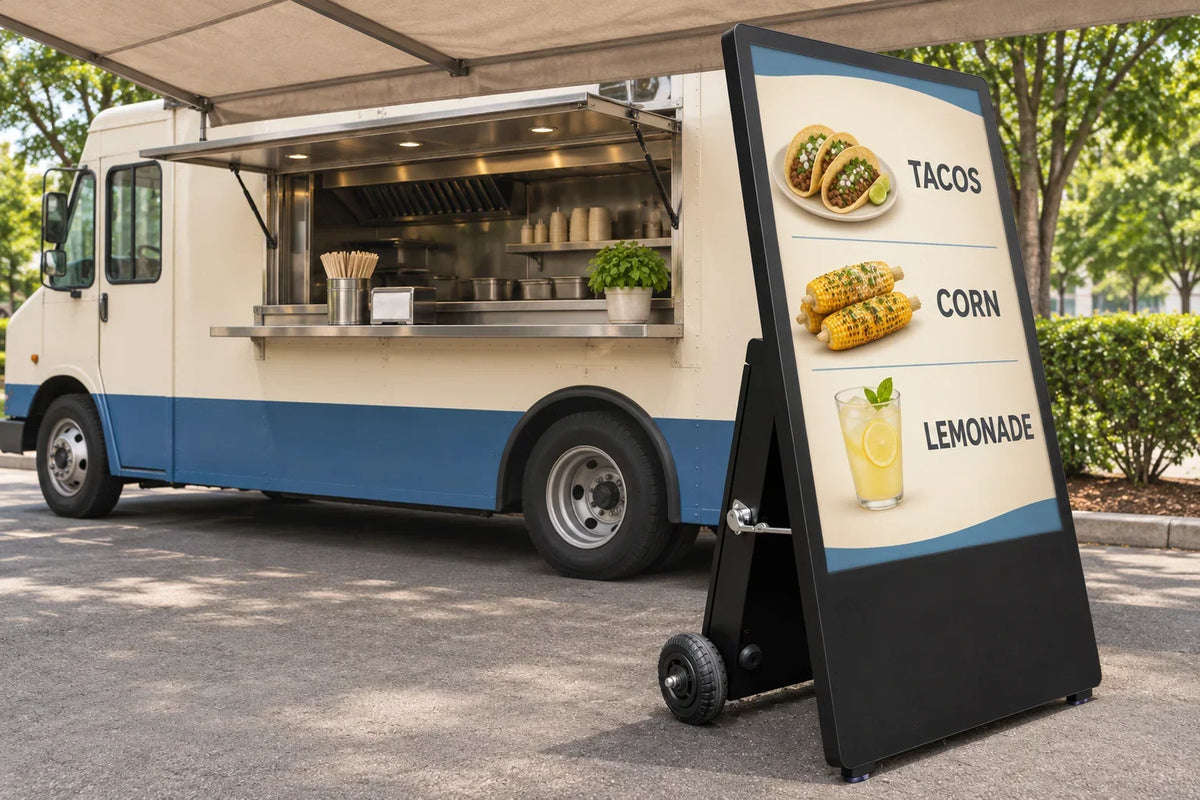
Separate three arrangements: a screen inside the truck behind glass, a screen attached to the vehicle, and a separate display positioned beside the parked truck. They have different exposure, fixing, handling, and service requirements. Approval of one arrangement does not approve the others.
For an inside-facing-out position, check reflections and heat through the complete window. A clear-looking service window is not an outdoor enclosure for the screen behind it. For vehicle attachment, obtain approval for the exact mounting and transport arrangement from the responsible suppliers. An ordinary wall bracket or freestanding base does not establish suitability for road travel.
For a fixed service lane rather than a traveling operation, use the drive-thru hardware and site-planning guide. Its permanent-lane assumptions should not follow the truck to every stop.
A separate outdoor unit also needs an approved position, stability arrangements, a handling route, and a place to store it. Gemdragon has existing outdoor floor-standing display formats; a particular configuration still needs to be matched to the location. Neither wheels nor the word portable establishes battery operation or permission to move a powered unit.

Walk the customer's approach before placing the display. Read the smallest necessary item and price from the queue, then check whether people gathering around the menu obstruct the service window or the route past the truck. Keep accessibility and site rules in the location review; the US Access Board's accessible-route guide explains why a route is a requirement, not leftover space.
Release today's menu, not yesterday's successful upload
Give the menu a location and a version. The useful record is not merely summer-menu-final.png. It identifies the stop, service period, approved prices, available items, and who may change them. A festival-specific offer should not quietly follow the truck to the next day's regular pitch.
Check the displayed menu against the ordering system or approved price list before opening. Include modifiers, portion descriptions, and qualifications that affect what the customer is buying. Keep required food and labeling information under the responsible operator's review. A screen supplier cannot approve the menu's legal or dietary accuracy.
The restaurant menu-board guide covers field ownership and dayparts. The additional food-truck job is to verify that the approved release belongs to this stop. If the software uses a schedule, check its date, time zone, and exception behavior rather than assuming the truck's location changes the player automatically.
Use a short daily release record
Keep the record somewhere the opening and closing crew can both access. It can be a paper sheet or an existing operations tool. These are proposed project fields, not a certificate or a claim that a particular CMS implements the workflow.
| Check | Record before service | Recheck when |
|---|---|---|
| Position | Approved placement, viewing direction, queue and access route | The truck, canopy, queue, or weather conditions change |
| Menu | Stop, service period, version, price source, checker | An item, price, offer, or availability changes |
| Power | Approved supply arrangement and responsible person | The supply or connected equipment changes |
| Playback | Actual screen checked online and in the agreed offline state | The network drops or the player restarts |
| Close | Shutdown, handling, storage, and next-stop menu ownership | Before moving or packing the equipment |
Review the complete power arrangement
Give the site electrician or responsible power provider the requirements of the complete setup: display, player, network equipment, and any other supplied components. A player's small power adapter is not the whole display load. Confirm the permitted input, the supply capacity, protection, cable route, and operating conditions for the actual equipment.

A vehicle's low-voltage system, an inverter, a battery package, a generator, and a venue outlet are different supply arrangements. Do not treat a connector that fits as electrical approval. If a generator is involved, follow its instructions and the responsible site's safety plan. OSHA's generator fact sheet identifies electrical, exhaust, fire, noise, and vibration hazards; choosing the display does not resolve those hazards.
If a quoted display uses a battery, verify the full shift at the brightness and workload you actually need, including the recharge window and reserve. Our battery-powered signage guide explains that comparison. This article promises no runtime and assumes no battery is installed.
Test a usable menu when the connection disappears
Before service, rehearse loss of the connection on the actual player. Check what remains visible, whether a restart changes the result, and what happens when the connection returns. A cloud editor opening on a phone does not prove that the endpoint has downloaded the latest menu.
Some software suppliers describe local caching for their own players. Decker's food-truck page, for example, separates the screen, player, and menu software. That is a useful architecture question, not evidence that a different player has the same behavior or POS connection. Use the offline playback test with your selected configuration.
Agree how the crew handles sold-out items while offline. A locally cached image may keep displaying perfectly while becoming commercially wrong. Decide who can change it, how the revised version reaches the screen, and which approved printed or other fallback the crew uses if it cannot. Test that action with the person who will actually run the shift.

Close the display task before the truck moves
Follow the supplier-approved shutdown and handling instructions. Separate switching off, disconnecting, securing for transport, and storing: completing one does not complete the rest. Record damage or moisture concerns before the next setup, and do not improvise a repair just to preserve a lunch service.
Keep the accepted hardware configuration, cables, menu version, and opening checklist together in the next-stop handoff. Where conditions exceed the agreed operating arrangement, use the approved alternative and refer the setup back to its responsible owner. The practical goal is repeatable opening, not a promise that every pitch suits the same display.
Questions before buying
Can I use a normal TV in the service window?
Evaluate the exact TV, optical path, exposure, operating profile, mounting, and recovery behavior. A TV behind glass is not automatically protected against heat or moisture. Compare the complete arrangement with an outdoor-rated option rather than deciding by the HDMI socket.
Does a portable outdoor display include a battery?
Portability, outdoor suitability, and cordless operation are separate configuration questions. Confirm each against the proposed unit and its instructions.
Should the digital board replace every printed sign?
Only if the operating plan supports it. Keep a suitable approved fallback when the crew needs a menu without the display or its power supply. The paper-versus-LCD comparison helps assign those jobs.
Bring the daily operating cycle to the quotation
Send the proposed display position, location photos, menu sample, operating hours, power arrangement, connectivity, and transport/storage plan. Ask Gemdragon to discuss the display configuration against those requirements. For permanent vehicle mounting or a third-party menu platform, keep the mounting and software approvals explicitly assigned.