Fine Text on an LCD Video Wall: Check Chroma Before Adding Pixels
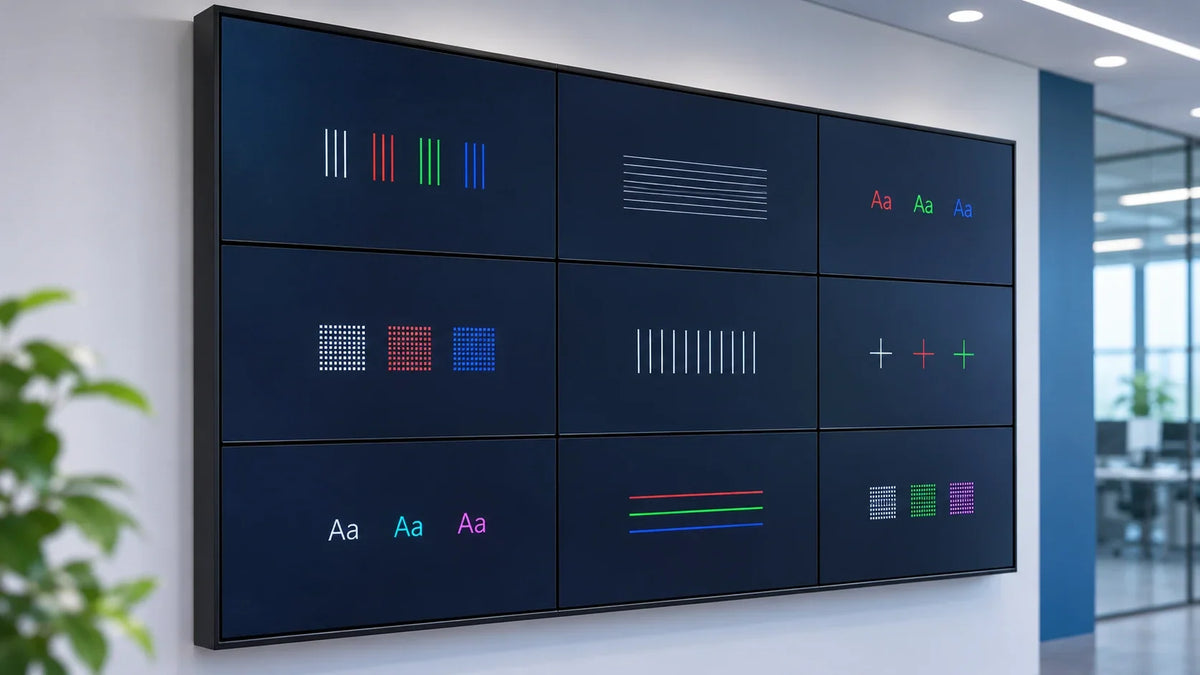
When fine colored text looks blurred on an LCD video wall, check the complete source-to-panel path before buying more resolution. Chroma subsampling, scaling, source rendering, and the size of the assigned window can all affect the result. A “4K” label does not establish that every character reaches the display intact.
This matters when an integrator is commissioning dashboards, control-room maps, or dense business information. Large photographs may look convincing while a colored one-pixel line or a small status label exposes a problem. Test the content people need to read, not just the content that flatters the system.
Separate three questions about the picture
First, is the source rendering enough detail? A low-resolution desktop or a compressed screenshot has limits before it enters the wall. Enlarging it makes those limits larger too.
Second, what happens to that detail in transit and processing? A source output, adapter, extender, codec, controller, or display input may use a different signal mode from the one expected. Record the actual supported configuration rather than assuming the highest resolution in a product brochure applies at every refresh rate and color setting.
Third, how many useful pixels does the final information window receive? An impressive aggregate wall canvas can still contain a small source window with unreadable text. Our 2x2 and 3x3 layout comparison addresses the broader canvas decision; this guide examines what happens to fine color detail within that layout.
Scroll horizontally to see all columns.
| Layer | Record before testing | A useful check |
|---|---|---|
| Application | File, browser or app scale, desktop resolution | Inspect the original text and image quality |
| Source output | Actual timing and color format | Confirm what is being sent, not only what was requested |
| Transport and processing | Equipment and selected input/output modes | Identify conversion, compression, cropping, and scaling stages |
| Panel input | Accepted signal and picture settings | Compare supported mapping and enhancement settings |
| Viewer | Assigned seat and operational content size | Confirm the actual words and values remain usable |

What does 4:4:4 change for text?
Chroma subsampling reduces color-detail sampling relative to the brightness information. Depending on the content and processing, colored edges and small text can reveal that reduction more clearly than full-motion video does. It is one reason two signals with the same nominal pixel dimensions can look different on a desktop-style dashboard.
Extron's 4:4:4 test-pattern guidance specifically recommends inspecting fine lines and text for changed color, thickness, or smearing when assessing color processing. Its explanation concerns the signal path and its own test tool; it does not establish a supported 4:4:4 mode for an unspecified Gemdragon configuration.
Use the selected equipment's documentation to define the required input and output mode. RGB and YCbCr terminology, bit depth, timing, and chroma format should be recorded as the devices actually report them. Do not force an unsupported mode or make a cable substitution solely because a connector fits.
Also avoid treating chroma as the explanation for every soft picture. If black text, colored text, and the whole image are all being resized poorly, scaling may be the more useful first investigation. If only some source windows look different, compare their paths and transformations before changing every panel.
Build a test that isolates one variable
Create a small, versioned evaluation package with ordinary black-and-white text, colored text, fine horizontal and vertical lines, and representative dashboard labels. Include text sizes the real layout uses. Keep essential test elements inside a visible panel so a physical bezel is not mistaken for missing signal detail.
The test file is an input to the investigation, not proof of performance. Show it at the intended mapping and record any application zoom or scaling. A test pattern enlarged by a browser, compressed into a slide, and resized again by a controller is no longer a clean check of the original single-pixel features.
Where the agreed design and equipment allow it, compare a supported short reference path with the proposed full path. Keep the source, display settings, and signal mode documented. Change one stage or setting at a time, then restore the accepted configuration. A reference path is useful only if the comparison preserves the variables you mean to test.

Use this sequence to keep the investigation bounded:
- Verify the original source package on a known reference arrangement.
- Display it through the proposed wall path at the intended source-window size.
- Record the reported input/output mode at the available observation points.
- Compare fine colored detail with neutral detail; note whether the issue affects the whole picture or particular sources.
- Investigate the relevant conversion or scaling stage using its documented options.
- Repeat the real operating layout and normal restart sequence after accepting a change.
Do not silently improve a test by making the text much larger than the operating dashboard. That may be the right content-design fix, but it is a different decision and should be recorded as one.
Make the acceptance record describe the reading task
For a dashboard, “picture visible” is not enough. List the critical fields, intended viewers, source-window size, and the conditions under which they must remain readable. Keep a reference capture of the source file and a photograph of the overall wall, while recognizing that a photograph can add its own sharpening, compression, exposure, and color changes.
If a numerical image-quality tolerance is needed, agree a suitable measurement method with the responsible AV specialist. An ordinary phone close-up is useful support evidence, not a calibrated measurement of signal processing.
Record the accepted source, software version, output mode, transport, controller preset record, and panel settings. Attach the actual test file rather than a screenshot of a screenshot. Your future service team deserves an original, even if the email thread does not.

Keep geometry separate from sharpness. Bezel compensation governs what happens at physical frames. EDID troubleshooting helps when the negotiated mode changes. Neither substitutes for checking the final fine-text result.
Will 4:4:4 make every dashboard readable?
No single signal attribute resolves source quality, scaling, insufficient window size, viewing distance, or content design. Evaluate those independently and test the actual task.
Can we infer 4:4:4 support from a 4K specification?
Request the supported mode for the exact source, transport, processor, and panel input. Resolution alone does not specify chroma format, refresh rate, or behavior under the intended layout.
Should text cross the panel grid?
Keep critical characters whole where readability is required. Decide the visible information zones and seam mapping separately, then test the final layout at the assigned seats.
For a Gemdragon LCD video wall proposal, provide a non-sensitive dashboard sample, the source/output requirements, planned window layout, and viewing positions. Discuss the configuration and evaluation task before treating a resolution label as the acceptance criterion.