Recessed vs. Surface-Mounted Digital Signage: Compare the Service Space
Compare the normal operating position and the service position before committing to a recessed wall display.
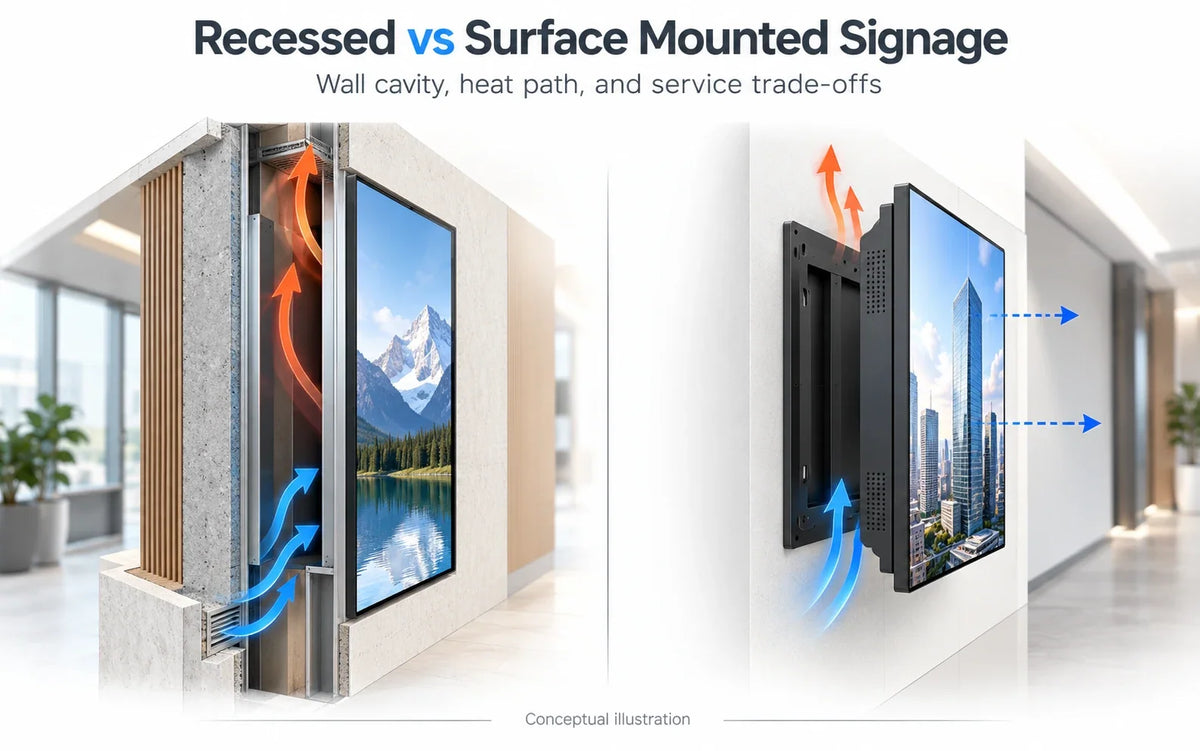
Cover illustration: compare wall recesses, rear service access and heat paths.
Choose between recessed and surface-mounted digital signage by comparing the equipment's operating and service space, as well as the front appearance. A flush-looking installation can be a good architectural solution, but only when the cavity, connections, heat path, and removal method work together.
For a retrofit, the decisive question is often practical: can the selected display be installed, operated, and replaced without unplanned damage to the surrounding wall? Decide that before anyone cuts an opening.
Define what you mean by recessed
The term can describe several different arrangements: a display sitting in a shallow architectural alcove, a screen and mount inside a deeper cavity, or a dedicated enclosure with a finished front frame. Those arrangements have different boundaries and service methods. Label the proposed section rather than relying on the word flush.
Surface mounting also varies. A fixed bracket, an articulating arm, and a framed on-wall enclosure do not occupy the same space. Compare specific assemblies, including the chosen display and any player, rather than treating each category as one product.
There is useful industry precedent for keeping these concerns together. Legrand AV's Chief Impact on-wall enclosure overview describes service access, frame adjustment, and cooling provisions as parts of its own enclosure designs. Those are manufacturer-specific features; they are not specifications or compatibility claims for a Gemdragon display.

Review two sections: closed and open
The closed section shows the equipment in everyday use. Mark the wall finish, cavity or bracket, connectors, display, trim, and any ventilation openings required by the equipment instructions. Confirm which dimensions belong to the selected size and touch configuration.
The open section shows how a technician reaches the equipment. Where does the display move? What must be released first? Can the release mechanism be reached after the trim is fitted? Where will the weight be supported while connections are accessed? The installer should be able to describe the sequence using the proposed hardware's instructions.
Do not assume that all recessed installations require the same pop-out mount, fans, or clearance. Equally, being on the surface does not guarantee unrestricted airflow or easy access. A nearby cabinet, wall return, or tight decorative frame can obstruct a surface-mounted display too.
Compare the spaces that remain after installation
Scroll horizontally if needed to compare all columns.
| Design question | Recessed arrangement | Surface arrangement |
|---|---|---|
| Building work | Establish what the cavity changes and who approves it | Establish fixing and cable-route requirements |
| Heat path | Identify how the complete cavity exchanges heat under the approved equipment design | Check the actual wall gap and surrounding obstructions |
| Connections | Show plug insertion, cable routing, and access inside the cavity | Show what can be reached behind or beside the installed screen |
| Removal | Demonstrate the release and extraction path through the finished opening | Demonstrate the release and lifting or extension path |
| Future replacement | Compare opening, mount, and connection constraints with the proposed replacement | Compare bracket, projection, and connection constraints |
| Finish repair | Assign access-panel and trim removal or repair | Assign exposed fixing and cable-cover repair |
This is a design comparison worksheet. Neither column is automatically the cheaper or more serviceable choice; the site and assembly determine that.
Keep the heat path independent of the decorative gap
A visible gap around the screen is not a thermal design. It may be a shadow detail, a removal clearance, or part of an intended air path. Ask the equipment supplier and installer to identify its actual purpose.
For the proposed configuration, obtain the installation requirements and mark the relevant air openings and obstructions on the section. Include other heat-producing equipment planned for the same space. A player or power device hidden in the cavity still belongs in the review.
Have the responsible team define how the finished installation will be checked under its intended operating conditions. Record the actual configuration, content, operating schedule, room conditions, and the supplier's acceptance requirements. A brief demonstration with the front trim removed does not reproduce a closed cavity.
Do not add fans, drill new openings, or block existing vents as an improvised remedy. A change to the enclosure or surrounding construction needs the appropriate design review. A neat cutout is easy to photograph; the air path deserves equally clear documentation.

Rehearse the replacement that someone will eventually perform
Ask for a supported service sequence before finalizing the finish. The sequence should identify the people and equipment needed, how the display remains supported, which connections are released, and how the assembly returns to its operating state.
Then consider a replacement with different enclosure dimensions. The same screen diagonal does not establish the same outer dimensions, mounting position, or plug location. A recess that accepts today's unit may constrain a future replacement, even when the image size is unchanged.
An oversized opening is not a universal solution either. It affects trim, support, appearance, and possibly the surrounding construction. Decide whether the project prioritizes a tightly integrated current installation or some defined replacement flexibility, and document what that flexibility actually covers.
If the design needs an unfinished display integrated into a custom enclosure, review the appropriate product format with the supplier. Do not assume that a complete wall-mounted unit can be converted into an open-frame assembly simply by removing parts.

Resolve the building questions before release to manufacture
The display drawing does not establish whether the wall can be altered. Have the responsible site professionals identify the wall construction, concealed services, structural fixing requirements, and any fire, acoustic, or other building constraints relevant to the work.
Where the screen faces a circulation path, review the finished projection separately using the corridor projection guide. A recessed appearance does not, by itself, establish accessibility compliance.
Record the accepted section and service sequence alongside the display and mount revisions. An installer substitution that changes the bracket's extension or the connector arrangement should trigger another check before the opening is closed.
Is a surface-mounted display always easier to maintain?
No. Access depends on the mount, surrounding finishes, release method, and cable arrangement. Compare the actual service sequences.
Can a general clearance number cover every recessed display?
Use the requirements for the selected complete configuration and cavity design. A number copied from another display does not establish an acceptable heat or service arrangement.
What should I compare when replacing an existing flush-mounted screen?
Compare the opening, outer enclosure, fixing positions, connections, operating clearances, and removal path. Screen diagonal alone is insufficient.
Specify the assembly you intend to maintain
For Gemdragon's Ultra-Thin Wall-Mounted Digital Signage, provide the intended size, touch requirement, and proposed installation section. Its wall-mounted product identity does not mean every recessed arrangement has been approved.
Request a Quote with the existing opening or wall conditions and the service constraints. The broader wall-mounted display guide can help organize the remaining viewing and mounting choices.
Product photos, catalog renders, and video stills are supplied Gemdragon materials with source-specific captions. Covers and diagrams are conceptual illustrations, not field measurements or installation approvals.