

INDOOR DIGITAL SIGNAGE · ROTATING SCREEN
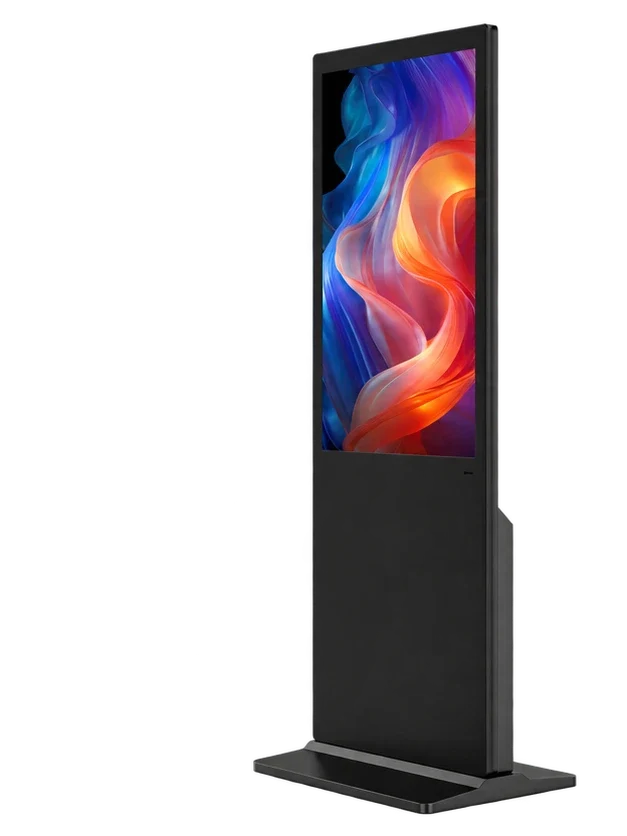
55-Inch Rotating Floor‑Standing Digital Signage
One screen. A different way to frame the story.
Switch between a portrait campaign and a landscape presentation on the same 55-inch LCD. This rotating floor-standing digital signage display supports a 0–90° screen-position range, with optional touch and Android, Windows, standalone or dual-system playback.
FRAME THE STORY FOR THE MOMENT
From a portrait campaign to a wide presentation.

Let the format follow the content.
Use portrait for a campaign poster, featured product or visitor interaction. Rotate the screen to landscape for a wide product film, presentation or welcome message. Prepare the content layout for the position you intend to use.
Choose interaction, or keep it visual.
Select non-touch for promotional playback, or add touch for an application that visitors can use. Review the operating height, reach and software layout in the screen position you plan to use.
Keep local playback simple.
Choose a local-media player for USB updates and automatic looping. Match file formats, playback schedules and timer settings to the player, so a single-site installation can run without a remote publishing workflow.
ONE SCREEN. TWO CONTENT ORIENTATIONS.
Rotate 0–90°. Match the content to the position.

A full-height campaign.
Frame a poster, a product story or visitor content in portrait. Prepare the layout for the audience distance and the application.
Room for the wider story.
Present a product film, a welcome message or a wide layout in landscape. Match the content and player settings to this position.
| LCD screen | 55 inches · one physical screen |
|---|---|
| Rotation range | 0–90° |
| Lower panel | Static cabinet housing |
| Site planning | Base footprint, overall height and screen-sweep clearance |
Review the cabinet drawing, visitor approach, power/data route and service access for the positions you will use.
THE RIGHT FORMAT FOR THE PLACE
Promote in store. Present in the showroom. Welcome at the venue.
Retail campaign displays
Give a portrait campaign a full-height presentation beside featured merchandise. Switch the format when the next campaign calls for a wide product film.
Showroom presentations
Present product films, architecture, demonstrations and brand stories in landscape. Coordinate the media format, audience position and playback workflow.

Events & visitor reception
Use a freestanding information point for welcome content and indoor event messages. Plan the orientation, venue placement, cable route and repeat setup together.
Application visualizations.
CONFIGURED AROUND YOUR PROJECT
Choose the display. Shape the workflow.
Select the size, touch preference and playback system for your inquiry.
Published configuration reference prices
Contact us for sample, wholesale or project pricing.
| Store reference configuration | Price |
|---|---|
| Default Title | $560.00 USD |
CONTENT MANAGEMENT
Keep every screen on the same content plan.
Permanent LAN and WAN CMS use is included with compatible Android LCD configurations.

Build a program that tells the whole story.
Combine image, video, text and clock regions in a multi-zone layout.
Put the right message on at the right time.
Plan campaigns by date, weekday and time period, with scheduled playback.
Keep screen groups on the same content plan.
Organize screens into groups and subgroups, then publish programs to the relevant locations.
See publishing progress and supported device settings.
Review task status and playback records, with supported brightness, volume, timer and restart controls.
- Wi-Fi or RJ45 Ethernet; compatible 4G hardware and SIM optional
- User roles and program review on supported deployments
- Local or remote workflows matched to your rollout
Functions depend on the controller, player and software version. Mobile data charges and service capacity are separate; Windows publishing software is specified by project.
TECHNICAL DETAILS
Compare the details that shape the build.
Product options and component references, organized for configuration planning.
Product configuration
| Product format | Rotating floor-standing |
|---|---|
| Screen-size options | 55 inches |
| Screen layout | Single Screen |
| Touch | Optional |
| Playback systems | Android / Windows / Standalone / Dual System |
| Dual-system choices | Android + Windows / Android + Linux |
| Application environment | Indoor |
| Commercial operation | 24/7 playback |
| Screen rotation | 0–90° · portrait / landscape positioning |
| Lower front panel | Static cabinet panel |
| Content orientation | Matched to the player, application and prepared layout |
| Network options | Wi-Fi / RJ45 Ethernet; compatible 4G hardware and SIM optional |
Plan the screen’s movement as well as its footprint.
Review the cabinet and base drawing, overall height and the clearance required as the 55-inch screen changes orientation. Allow space for visitors, power/data cables, ventilation and service access. Include packing and transport needs for repeat event use.
Screen configuration reference
| Native panel resolution | 3840 × 2160 (UHD) |
|---|---|
| Active area, native landscape (W × H) | 1209.6 × 680.4 mm |
| Panel mode | IPS · normally black, transmissive |
| Typical contrast | 1300:1 (typ.) |
| Viewing angle (L / R / U / D) | 89° / 89° / 89° / 89° (typ., CR ≥ 10) |
| Panel response time | 8 / 10 ms (Tr / Td, typ.) |
| Display colors | 1.07B (8-bit + Dithering) |
| Panel refresh rate | 60 Hz |
| Panel operating temperature | 0–50 °C |
Panel reference values; the ordered panel is selected with the configuration.
RK3566 · Android platform
| CPU | Quad-core 64-bit Cortex-A55 · up to 1.8 GHz |
|---|---|
| GPU | ARM Mali-G52 2EE |
| Operating system | Android 14 |
| RAM | 2 GB / 4 GB LPDDR4X |
| Onboard storage | 32 GB eMMC |
| Ethernet / wireless | 100 Mbps RJ45 · dual-band 2.4 / 5 GHz Wi-Fi |
| Board display interfaces | LVDS / eDP / MIPI-DSI / HDMI output |
| USB on the board | 1 × USB 3.0 host · 1 × USB 2.0 OTG · 5 expansion headers |
| Board power input | DC 12 V |
| Storage expansion | TF card up to 512 GB |
Available player reference; cabinet connections follow the selected build.
Electrical planning
| RK3566 / RK3576 board input | DC 12 V (internal board input) |
|---|---|
| Complete-display mains input | Specified for the selected display configuration |
| Rated display power | Specified with the selected size, panel, brightness and player |
PRODUCT VIEWS
A closer look at the form.
YOUR BRAND. YOUR WORKFLOW.
Make the display work for your project.
From a branded housing to a connected application, specify what the deployment needs.

Branding
Logo on the cabinet, packaging and manual. Custom boot images or animations.

Finish & Housing
RAL color matching and project-specific enclosure changes.

Screen Surface
AR, AG or anti-fingerprint film matched to the panel and optics.

Software
Pre-installation, default language, debugging and project-scoped SDK licensing.

Peripherals
Discuss cameras, microphones, QR scanners, NFC, printers and sensors.

Packaging
Carton or flight case, labels and destination-specific packing.
Customization feasibility, MOQ, engineering cost and timing are quoted against the requested scope.
FROM CONFIGURATION TO DEPLOYMENT
One team for the project details.
Coordinate the display, content workflow, documentation and service path.
Configuration & integration
Review the application, player, touch, peripherals and installation requirements together.
Branding & production
Specify the finish, logo, startup presentation and packing. Manufacturing covers sheet-metal work, display-module assembly, final assembly, inspection and packing.
Deployment & service
Prepare configuration documents, packing information, setup guidance and technical support around your rollout.
- Configuration review
- Agreed specification
- Production & inspection
- Packing & shipment
- Setup & service
DOCUMENTED FOR YOUR PROCUREMENT REVIEW
Certifications & Compliance
Product compliance, certified management systems and SGS supplier assessments.
Product Compliance


 EMCLVDRED
Management Systems
SGS Supplier Assessment
SGS — Gemdragon supplier assessment
491201445_T
Gemdragon trade assessment · 2026
View document detailsSGS — Manufacturing partner assessment
494211001_P+T
Manufacturing partner production and trading assessment · 2026
View document detailsCOMPANY PRODUCTION
Inside display-module assembly.
Display-module assembly
Company production footage · modular backlight assembly excerpt · silent
BEFORE YOU SPECIFY
Answers for your project.
Which screen size does this rotating product use?
This product uses a 55-inch LCD. Select the display and player around the intended portrait or landscape content, audience position and installation space.
How far can the screen rotate?
The product materials specify a 0–90° screen-position range, allowing portrait and landscape presentation. Review the operating position and screen clearance with the cabinet drawing.
Does it rotate automatically during playback?
Specify any motorized or scheduled movement requirement separately. The documented product capability is screen positioning through 0–90°; the movement mechanism and operating workflow are agreed with the configuration.
Will the content automatically reformat when the screen turns?
Content orientation is controlled by the player and application. Prepare portrait and landscape layouts, and agree how your software will select and present the appropriate content.
Is the black panel below the screen another display?
No. There is one physical LCD at the top. The lower black area is a static cabinet panel and does not display digital content.
Can the same unit show a poster and a wide video?
Yes. Use the upper LCD in portrait for poster-style content or landscape for wide media. Match the screen position, media aspect ratio and player settings before playback.
Is a touch-enabled version available?
Yes, touch is optional. Share the application, expected screen position, operating height and visitor interaction so the touch assembly and player can be selected.
Can it run our own Android APK or signage application?
Choose Yes under own software or APK and share the application, required system version, content formats and peripheral needs. Our team will review the hardware and deployment requirements with you.
Which playback systems can we choose?
Android, Windows, standalone and dual-system options are available. Dual-system pairings are Android + Windows or Android + Linux, specified around the applications and switching requirements.
Can we change programs remotely?
Compatible Android configurations include permanent LAN and WAN CMS use. Create programs, schedule playback, organize screen groups and publish content remotely using a suitable network connection.
Do remote updates require a 4G SIM?
No. Wi-Fi or RJ45 Ethernet can provide the connection. Compatible 4G hardware and a SIM are optional for sites that need cellular connectivity; mobile-data charges are arranged separately.
Can it play media from USB storage?
A local-media workflow is available with the selected player. Specify the content formats, storage and update process; USB playback and looping behavior follow the configured player.
Can the screen combine images, video and text?
The compatible Android CMS supports multi-zone programs containing images, video, text and clock regions. Design the regions for the portrait or landscape position used by the deployment.
How much room is needed around the display?
Use the selected cabinet and base drawing to plan the footprint, overall height and screen-sweep clearance. Keep the visitor route, cable access and service area clear in both intended orientations.
Can we use it at several indoor exhibitions?
Include repeat transport, setup, packing and handling needs in the project review. We can discuss suitable project packaging and the installation workflow with the display configuration.
What panel resolution and brightness should we specify?
Review the screen reference with the content, viewing distance and site lighting. The installed panel and brightness are specified with the build; a player’s output resolution does not establish the LCD panel’s native resolution.
Can you customize the cabinet and startup presentation?
Yes. Discuss cabinet finish, logo, startup image or animation, software deployment, surface treatment, peripherals and packing. Include venue or brand requirements with the inquiry.
Can this display be placed outdoors?
This is an indoor signage product. For exposed or outdoor locations, select an outdoor display and review the light, weather and operating conditions.
Which compliance documents support procurement?
Floor-standing LCD signage documentation includes EMC/CE, LVD/CE, FCC, RoHS and RED records. ISO 9001 and ISO 45001 cover the stated management-system activities; SGS assessments cover Gemdragon and its manufacturing partner separately. Request the document set for your selected configuration and destination.
What should we include when requesting a quote?
Send the quantity, destination, application, touch preference and operating system. Tell us whether you use your own software or APK, how you will use portrait and landscape content, and any installation, branding, packing or timing requirements.
LET’S DEFINE THE RIGHT DISPLAY
Tell us what you’re planning.
Share the application, size, quantity and software you have in mind.
Andy@gemdragondisplay.com