

INDOOR DIGITAL SIGNAGE · BROCHURE HOLDER
Digital Signage Kiosk with Brochure Holder
Capture attention on screen. Let visitors take the details.
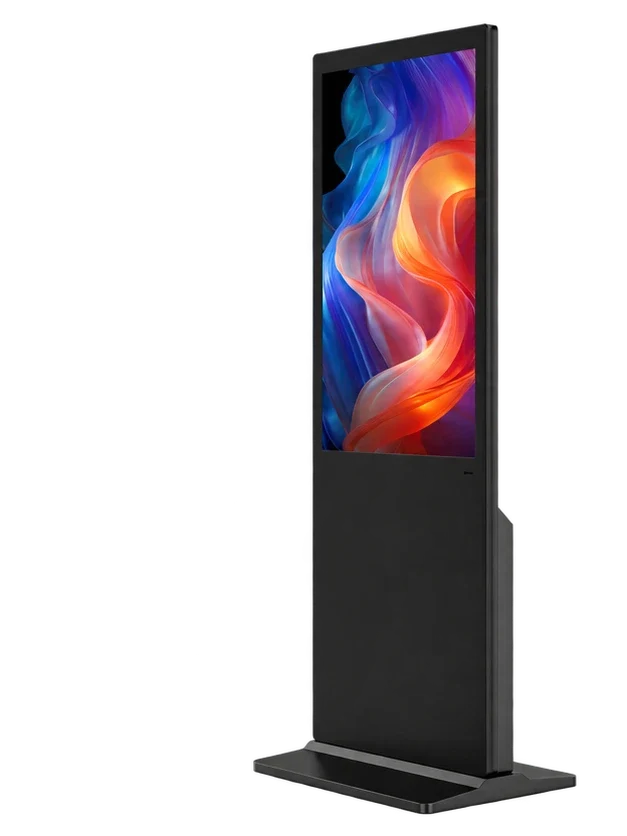
Bring digital campaigns and printed information together in one floor-standing display. This digital literature holder pairs an upper LCD with three paper brochure pockets below, giving visitors a story to watch and useful details to take away.
DIGITAL DISPLAY. PRINTED TAKEAWAY.
See it. Pick it up. Take it along.

Make the screen and the brochure tell one story.
Use the upper screen to introduce a destination, property or product. Place the matching map, floor plan or catalogue in the holders below so visitors can keep the information after leaving the display.
Three places for the details.
Separate printed material across three physical pockets. Organize the content by topic, language or campaign, then plan the paper format and replenishment routine around the installation.
Give reception a clear information point.
A slim metal cabinet combines digital messaging and paper literature in one freestanding format. Position it beside a reception desk, showroom route or exhibition welcome point where visitors can stop and browse.
Update locally, or manage the network.
Choose a local-media player for USB or SD updates, looping playback and scheduled on/off operation. For distributed sites, choose a connected configuration and manage campaigns through the CMS.
Add touch when visitors need to explore.
Touch is optional. Use the screen for promotional playback, or pair a touch assembly with your application for interactive information. Match the screen height, software layout and accessibility needs to the audience.
21.5-INCH CABINET REFERENCE
A slim information point. Room for the printed detail.

21.5-inch version
| Overall height | 1577 mm |
|---|---|
| Body width | 351 mm |
| Body depth | 40 mm |
| Base width × depth | 365 × 373 mm |
| Paper storage | Three physical brochure pockets |
Use the drawing for the selected screen size. Plan space to take and refill literature, reach the service area and route power/data cables.
CONTENT WORTH WATCHING. DETAILS WORTH KEEPING.
Make the next step easy for every visitor.
Hotel & tourism reception
Introduce the local destination or hotel services on screen. Offer maps, visitor guides and activity leaflets directly below for guests to take with them.
Real estate showrooms
Present the development story and property imagery on the LCD. Keep floor plans, property brochures and sales information available at the same viewing point.

Exhibitions & visitor welcome
Run a product or event introduction above printed catalogues. Give visitors a simple way to move from a short screen presentation to detailed material they can keep.
Application visualizations.
CONFIGURED AROUND YOUR PROJECT
Choose the display. Shape the workflow.
Select the size, touch preference and playback system for your inquiry.
Published configuration reference prices
Contact us for sample, wholesale or project pricing.
| Store reference configuration | Price |
|---|---|
| Default Title | $460.00 USD |
CONTENT MANAGEMENT
Keep every screen on the same content plan.
Permanent LAN and WAN CMS use is included with compatible Android LCD configurations.

Build a program that tells the whole story.
Combine image, video, text and clock regions in a multi-zone layout.
Put the right message on at the right time.
Plan campaigns by date, weekday and time period, with scheduled playback.
Keep screen groups on the same content plan.
Organize screens into groups and subgroups, then publish programs to the relevant locations.
See publishing progress and supported device settings.
Review task status and playback records, with supported brightness, volume, timer and restart controls.
- Wi-Fi or RJ45 Ethernet; compatible 4G hardware and SIM optional
- User roles and program review on supported deployments
- Local or remote workflows matched to your rollout
Functions depend on the controller, player and software version. Mobile data charges and service capacity are separate; Windows publishing software is specified by project.
TECHNICAL DETAILS
Compare the details that shape the build.
Product options and component references, organized for configuration planning.
Product configuration
| Product format | Upper LCD with three paper brochure pockets |
|---|---|
| Screen-size options | 21.5 / 22 / 27 / 32 / 42 inches |
| Screen layout | Single Screen |
| Printed literature | Three physical pockets; paper format matched to the build |
| Touch | Optional |
| Playback systems | Android / Windows / Standalone / Dual System |
| Dual-system choices | Android + Windows / Android + Linux |
| Cabinet | Metal enclosure with glass display front |
| Application environment | Indoor |
Plan the display, paper access and service space.
For the illustrated 21.5-inch cabinet, overall height is 1577 mm, body width 351 mm and body depth 40 mm; the base is 365 mm wide × 373 mm deep. Allow room to take and refill brochures, reach the rear service area and route power/data safely. Other screen sizes use their matching cabinet drawings.
Screen configuration reference
| Native panel resolution | 1920 × 1080 (FHD) |
|---|---|
| Viewing angle (horizontal / vertical) | 178° / 178° |
Panel reference values; the ordered panel is selected with the configuration.
RK3566 · Android platform
| CPU | Quad-core 64-bit Cortex-A55 · up to 1.8 GHz |
|---|---|
| GPU | ARM Mali-G52 2EE |
| Operating system | Android 14 |
| RAM | 2 GB / 4 GB LPDDR4X |
| Onboard storage | 32 GB eMMC |
| Ethernet / wireless | 100 Mbps RJ45 · dual-band 2.4 / 5 GHz Wi-Fi |
| Board display interfaces | LVDS / eDP / MIPI-DSI / HDMI output |
| USB on the board | 1 × USB 3.0 host · 1 × USB 2.0 OTG · 5 expansion headers |
| Board power input | DC 12 V |
| Storage expansion | TF card up to 512 GB |
Available player reference; cabinet connections follow the selected build.
Electrical planning
| Player-board supply | DC 12 V reference for the listed Android boards |
|---|---|
| Complete-display mains input | Matched to the selected display and destination |
| Rated whole-display power | Specified with the panel, brightness and player |
| Cable route | Power and data access at the rear cabinet |
PRODUCT VIEWS
A closer look at the form.
YOUR BRAND. YOUR WORKFLOW.
Make the display work for your project.
From a branded housing to a connected application, specify what the deployment needs.

Branding
Logo on the cabinet, packaging and manual. Custom boot images or animations.

Finish & Housing
RAL color matching and project-specific enclosure changes.

Screen Surface
AR, AG or anti-fingerprint film matched to the panel and optics.

Software
Pre-installation, default language, debugging and project-scoped SDK licensing.

Peripherals
Discuss cameras, microphones, QR scanners, NFC, printers and sensors.

Packaging
Carton or flight case, labels and destination-specific packing.
Customization feasibility, MOQ, engineering cost and timing are quoted against the requested scope.
FROM CONFIGURATION TO DEPLOYMENT
One team for the project details.
Coordinate the display, content workflow, documentation and service path.
Configuration & integration
Review the application, player, touch, peripherals and installation requirements together.
Branding & production
Specify the finish, logo, startup presentation and packing. Manufacturing covers sheet-metal work, display-module assembly, final assembly, inspection and packing.
Deployment & service
Prepare configuration documents, packing information, setup guidance and technical support around your rollout.
- Configuration review
- Agreed specification
- Production & inspection
- Packing & shipment
- Setup & service
DOCUMENTED FOR YOUR PROCUREMENT REVIEW
Certifications & Compliance
Product compliance, certified management systems and SGS supplier assessments.
Product Compliance


 EMCLVDRED
Management Systems
SGS Supplier Assessment
SGS — Gemdragon supplier assessment
491201445_T
Gemdragon trade assessment · 2026
View document detailsSGS — Manufacturing partner assessment
494211001_P+T
Manufacturing partner production and trading assessment · 2026
View document detailsSEE THE ACTUAL PRODUCT
A closer look at the screen and brochure cabinet.
Brochure-holder digital signage — actual unit
Original product footage · screen playback and three paper pockets · silent
Display-module assembly
Company production footage · modular backlight assembly excerpt · silent
BEFORE YOU SPECIFY
Answers for your project.
Which screen sizes are available?
Choose 21.5, 22, 27, 32 or 42 inches. Match the display size, cabinet drawing and printed-material format to the viewing distance and space available.
How does the brochure holder work with digital signage?
The upper LCD presents campaigns, information or video. Three physical pockets below hold printed material, so visitors can watch the introduction and pick up the details at the same point.
Is the lower section another screen?
No. This is a single-screen display. The three lower sections are physical paper brochure pockets, not electronic displays.
What printed material can the pockets hold?
Brochures, folded maps, catalogues, magazines and similar literature can be planned around the pocket design. Share your paper width, height, thickness and desired quantity so the holder dimensions can be matched.
Do printed brochures come with the display?
Discuss printing, artwork and printed-material supply separately from the display hardware. Send the intended paper format and replenishment plan with your project requirements.
What are the dimensions of the 21.5-inch version?
The illustrated 21.5-inch cabinet is 1577 mm high, with a 351 mm-wide body and 40 mm body depth. Its base measures 365 mm wide × 373 mm deep. These dimensions describe the 21.5-inch reference, not the other screen sizes.
What resolution does the 21.5-inch screen use?
The 21.5-inch product reference specifies a 1920 × 1080 FHD panel and a 178° horizontal / 178° vertical viewing angle. The ordered panel and playback configuration are selected together.
Is touch available for visitor information?
Yes. Touch is optional. Share your information application, operating height and visitor needs so the touch assembly, player and user interface can be reviewed together.
Can we run our own software or Android APK?
Yes, a suitable system can be configured around your application. Select Yes under own software or APK, then share the app, operating-system requirements, content formats, network and peripheral needs.
Which operating systems and player options are available?
Android, Windows, standalone and dual-system options are available. The dual-system choices are Android + Windows or Android + Linux, matched to the software and switching requirements.
Can we update content without a network?
Choose a local-media configuration for USB or SD updates and looping playback. Agree the file formats, storage and update procedure with the selected player.
Can we schedule playback and on/off times?
Scheduling, loop playback and timed on/off operation can be configured with the selected player. Include opening hours and any unattended-operation requirements in the project review.
Can we manage digital brochure stands at several locations?
Compatible Android configurations include permanent LAN and WAN CMS use. Create programs, schedule content, organize screen groups and publish updates remotely. Coordinate printed literature and refill routines separately at each site.
Is a 4G SIM required for remote publishing?
No. Wi-Fi or RJ45 Ethernet can provide connectivity. Compatible 4G hardware and a SIM are optional for sites that need cellular access; mobile-data charges are separate.
Can the screen combine images, video and text?
The compatible Android CMS supports multi-zone programs with images, video, text and clock regions. Design the content for the chosen screen size and portrait presentation.
Can it be moved between indoor locations?
A caster-base requirement can be reviewed with the cabinet and deployment plan. Share how often the unit will move, the floor conditions, cable management and packing needs; do not move the unit with loose literature or unsecured cables.
What can we customize?
Discuss cabinet color, logo, startup image or animation, software installation, surface treatment, peripherals, brochure-pocket requirements and packing. Match each item to your brand and operating workflow.
Where is a signage display with brochure holders most useful?
It suits indoor reception and browsing points where a short screen message leads into printed detail, such as hotel lobbies, tourism desks, property showrooms and exhibition welcome areas.
Which procurement documents can we review?
Floor-standing LCD signage documentation includes EMC/CE, LVD/CE, FCC, RoHS and RED records. ISO 9001 and ISO 45001 address the stated management activities; SGS assessments cover Gemdragon and its manufacturing partner separately. Request the appropriate document set for your configuration and destination.
What information helps you quote this product?
Send the screen size, quantity, destination, application, touch preference and player choice. Tell us whether you use your own software or APK, the paper format and pocket needs, installation conditions, branding and timing.
LET’S DEFINE THE RIGHT DISPLAY
Tell us what you’re planning.
Share the application, size, quantity and software you have in mind.
Andy@gemdragondisplay.com