Portrait vs Landscape Digital Signage: Choose and Test the Orientation
Compare portrait and landscape signage by content, mounting, rotation, and touch. Includes an orientation acceptance checklist for integrators.
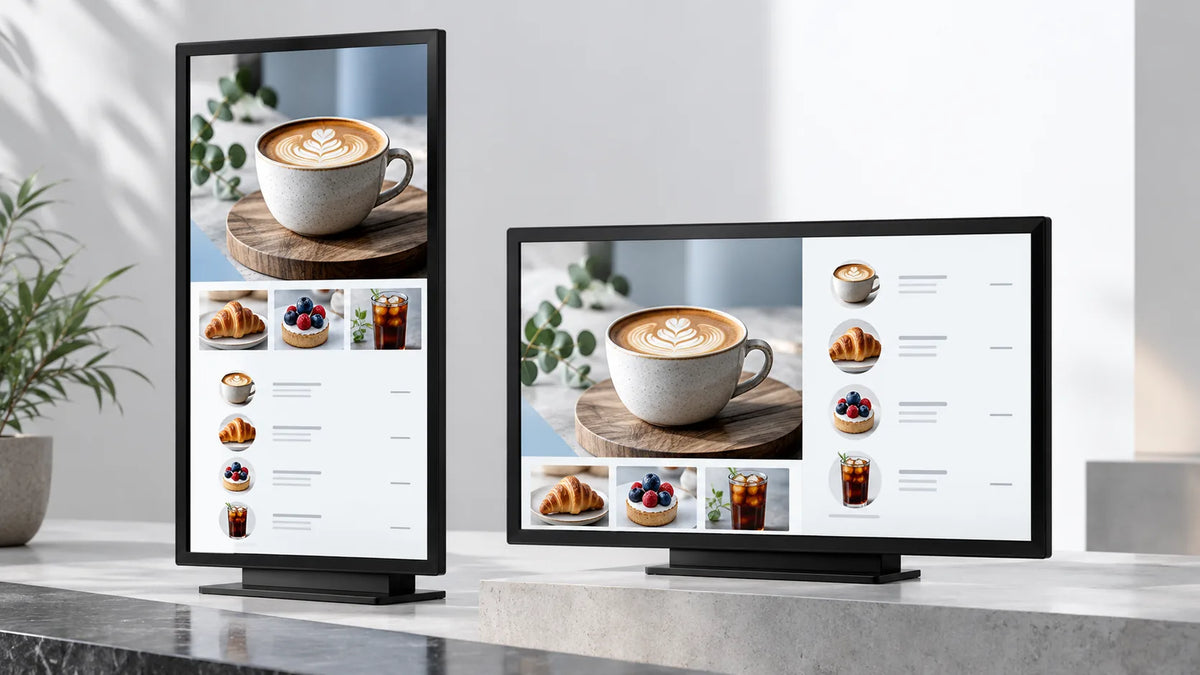
Cover illustration: a conceptual scene, not a Gemdragon model or completed customer installation.
Choose portrait or landscape digital signage around the viewer's task, the shape of the content, and the display's approved installation orientation. Portrait can suit a vertical product story or a directory. Landscape can suit a wide comparison or a horizontal video. The purchase decision also includes the mount, ventilation, player output, CMS canvas, and touch mapping. A picture rotated correctly in the editor does not establish that the installed system will work correctly.
Start with the message someone must read
Write the sentence the screen must communicate before choosing its shape. A person walking past an entrance needs a short message with an obvious next step. Someone comparing products beside a display may have time for a specification table. Put actual content into both layouts and remove anything that becomes too small at the intended viewing position.
For a hypothetical vehicle showroom, a portrait display beside a car could present the model, a small set of features, and a request for a demonstration. A landscape display across the room could compare several models. These are layout examples, not evidence that either format generates more sales.
Keep the physical screen-size decision separate. Orientation changes the available height and width; it does not make text automatically readable. Use our screen size and viewing distance guide to plan the mockup and viewing positions.

Compare both orientations on the same brief
| Decision | Portrait test | Landscape test |
|---|---|---|
| Main message | Can the reader follow a clear vertical sequence? | Can the reader understand the horizontal hierarchy? |
| Source assets | Is there a proper vertical crop? | Is the wide composition usable without small text? |
| Location | Is the whole display visible beside the doorway or product? | Does the available wall width accommodate the screen and service access? |
| Interaction | Are the controls reachable across the required interface? | Can the user reach controls at both sides? |
| Maintenance | Can the unit be opened in this arrangement? | Can cables and replaceable parts be reached? |
Do not stretch a landscape campaign to fill a portrait canvas. Recompose the headline, image crop, offer, and action. If content will run in both orientations, make both versions part of the production brief rather than leaving the second version to installation day.
Verify physical orientation before rotating content
Ask for the proposed model's installation instructions, permitted rotation direction, mount arrangement, and clearance requirements. A mounting pattern alone does not establish approval for either orientation. A rotatable bracket cannot grant an orientation that the display manufacturer excludes.
Samsung's standalone signage installation guide treats enclosure ventilation in relation to the product and its orientation. It is a manufacturer-specific reference, not a clearance specification for Gemdragon. Request the corresponding instructions for the model being quoted.
For a floor-standing enclosure, check the complete assembly. Do not assume a portrait totem can be turned sideways because its screen image can rotate. Review the base, stability, cable exits, and service doors with the supplier. The floor-standing buying guide covers those mechanical questions in more detail.

Trace orientation through the playback system
Record these separately: the mounted display orientation, the operating system's output orientation, the CMS layout dimensions, and any rotation applied to the media itself. Document where rotation should happen. Unplanned rotation in more than one layer can produce an incorrect final picture.
A landscape output carrying a portrait image is different from a player rendering a portrait desktop. Both arrangements can be proposed, but the chosen workflow must reproduce the intended layout on the actual unit. Capture the final settings rather than relying on a supplier's description of “portrait support.”
Where touch is required, test the corners, edges, main controls, and return path after rotation. Confirm that a press lands on the intended control and that the interface resumes correctly after inactivity. This is an acceptance task for the selected controller and software, not a general compatibility claim.
Use this orientation acceptance card
Copy the following into the sample test record:
- Identify the display, player, controller, firmware, CMS version, and approved physical orientation.
- Photograph the complete installation, including the base or mount and cable route.
- Load a test image with clearly labeled top, bottom, left, and right edges.
- Check for cropping, stretched circles, hidden text, and unused borders.
- Play representative video and any browser content in the final layout.
- Run the planned opening schedule and restart sequence. Confirm that orientation survives.
- If touch is included, verify input across the active area and after a restart.
- Save the settings and final on-screen photograph with the acceptance result.
A failure should identify the layer responsible. “Portrait does not work” is too broad to resolve. “The CMS canvas is correct, but the player returns to landscape after restart” gives the software owner something specific to investigate.

When should you choose a different format?
Choose the orientation that supports the main task without forcing small text or an awkward installation. If neither layout works, reduce the content, reconsider the screen position, or evaluate another display size. Adding pixels is a separate decision; our 1080p vs 4K guide explains the complete content-to-screen chain.
Frequently asked questions
Can every commercial display be mounted in portrait?
Do not assume so. Check the exact model's permitted installation arrangement and rotation direction. Confirm the enclosure and mount as well as the panel.
Does portrait always attract more attention?
There is no result established for your site by this guide. Compare the intended message in the real viewing area and test whether people can understand and act on it.
Can I reuse the same design in portrait and landscape?
Reuse the source material, but recompose the layout for each canvas. Check image crops, line breaks, the main action, and the smallest required text instead of stretching the finished design.
What should I test when rotating touch content?
After confirming that physical rotation is permitted, check touch alignment at the corners and edges. Complete the main task and the return path using the final player, software, and mounted orientation.
What should I send when requesting an orientation recommendation?
Send a site photo, intended viewing position, sample content, preferred screen size, and installation constraints. Identify whether touch is required and who will update the content.
Request an orientation check for your project
Send Gemdragon a site photograph, the desired orientation, representative content, screen-size preference, quantity, and proposed player or CMS. Ask for a model-specific configuration and the installation information needed for sample acceptance. You can start with the wall-mounted display range or floor-standing displays.
Request a display configuration check
This guide is a procurement and acceptance method. It does not approve an unlisted orientation, mounting load, or software configuration. More planning material is available in Gemdragon Resources.